File syntax
In the ScoreScript App, choose File → New score, press Ctrl+N, or find New score in the command palette. Save chooses the new file's name. If the current score or engraving has unsaved changes, the app offers Save, Discard, or Cancel before replacing it.
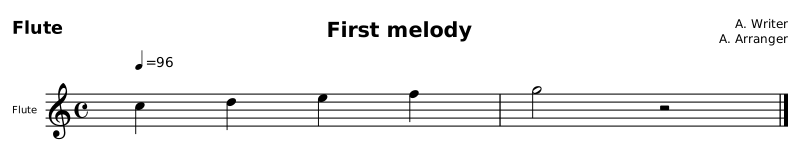
A complete file contains a version header, a score, optional settings, and music. This example is two bars for flute: four quarter notes, then a half note and a half rest.
scorescript 0.3
score "First melody" {
  composer "A. Writer"
  arranger "A. Arranger"

  meter 4/4
  key C
  tempo 96

  parts {
    flute
  }

  flute {
    m1-2 {
      4C5 D E F | 2G r
    }
  }
}
Original canonical spelling
scorescript 0.3
score "First melody" {
  composer "A. Writer"
  arranger "A. Arranger"

  meter 4/4
  key C
  tempo 96

  parts {
    flute
  }

  flute {
    m1-2 {
      4C5 D E F | 2G r
    }
  }
}
File components
scorescript 0.3 identifies the language version. score "First melody" names the work; its braces contain the settings and music. composer and arranger are optional printed credits; copyright "…" is the rights line a book prints in its page foot. Quote names containing spaces.
meter 4/4 gives each measure four quarter-note beats. key C sets the key signature. tempo 96 sets a quarter-note metronome speed of 96. parts { flute } declares the instrument. flute { ... } contains its music; m1-2 { ... } addresses measures 1–2, and | separates the two bars.
Read 4C5 as three pieces: 4 is a quarter note, C is the pitch, and 5 is the octave. D E F retain the quarter-note duration. They choose nearby pitches in the same melodic line. 2G is a half note; 2r is a half rest. The opening octave anchors the phrase; later notes follow relative contour.
Marks and bare music
Parenthesized marks attach to a note. A musical fragment can omit the file wrapper when no instrument or non-default setting is needed:
4C5(p) D E F | 2G(mf) r

Original canonical spelling
4C5(p) D E F | 2G(mf) r
(p) is piano and (mf) is mezzo-forte. The barline separates two measures. This shorter example is a fragment with the default 4/4 meter.
Bare music creates an unnamed part. It does not attach itself to the last instrument declaration. For example, part piano: Melody followed by bare notes outside a body declares an empty piano and a separate unnamed musical part. That can produce an unexpected extra staff. Use the roster-plus-body form above whenever an instrument is intended; check every resolved staff, not only the list of named parts.
Comments
Comments start with // and continue to the end of that physical line. They explain the source without adding music or printed performance text. Use a quoted musical text mark when the player should see words.
// This comment is not printed on the staff.
4C5 D E F

Original canonical spelling
// This comment is not printed on the staff.
4C5 D E F
File operations
To use the complete example, save it as first-melody.scorescript and open it in a ScoreScript editor, or use the CLI:
scorescript check first-melody.scorescript
scorescript format first-melody.scorescript --write
scorescript pdf first-melody.scorescript -o first-melody.pdf
Formatting may replace explicit measure lines with compact measure ranges. See parts and measures, pitch, and rhythm for the individual rules. Copying or downloading source is optional; the example and its notation describe the result directly.